Troll your friends by updating Facebook Status via iPhone, iPad, BlackBerry, Samsung Galaxy etc from your computer.


We might have seen many people updating their Facebook Status from their Smart phones like iPhone 4S, iPhone 5, iPad, BlackBerry, Samsung Galaxy Note, Samsung Galaxy S III, Sony Xperia Arc S, Windows Phone and many other popular devices.

But everyone is not much rich enough to buy expensive smart phones like iPhone, Blackberry, Windows Phone, Sony Xperia, Galaxy etc. 
So today www.SweetFun.tk will provide you a great trick to update your facebook status via iOS, iPad, iPod Nano, 
Android, Windows etc from your Computer only.


To Update Facebook status via iPhone 4S from your Computer : : Click Here.


--------------------------------------------------------------------------
Note: Some of the below apps are not working. We will update it soon.

--------------------------------------------------------------------------
To Update Facebook status via iPhone 5 : :  Click Here 

To Update Facebook status via iPhone 5S : : Click Here

To Update Facebook status via iPhone 5C : : Click Here

To Update Facebook status via iPhone 4S : : Click Here 

To Update Facebook status via iPhone / iOS : : Click Here 

To Update Facebook status via iPhone Diamond Rose Edition : : Click Here 

To Update Facebook status via iOS 6 : : Click Here

To Update Facebook status via iOS 7 : : Click Here 

To Update Facebook status via iPad : :   Click Here 

To Update Facebook status via Apple MacBook Pro : : Click Here

---------------------------------------------------------------------------------

To Update Facebook status via Android : : Click Here 

---------------------------------------------------------------------------------

To Update Facebook status via Blackberry : : Click Here

To Update Facebook status via Blackberry Z10 : : Click Here 

To Update Facebook status via BlackBerry Porsche P'9981  : :    Click Here

---------------------------------------------------------------------------------

To Update Facebook status via Nokia Lumia 720 : : Click Here

To Update Facebook status via Nokia Lumia 928 : : Click Here

To Update Facebook status via Nokia Lumia 1020 : : Click Here

To Update Facebook status via Windows Phone : : Click Here 

---------------------------------------------------------------------------------

To Update Facebook status via HTC Evo 3D : : Click Here 

To Update Facebook status via HTC Sense : : Click Here 


---------------------------------------------------------------------------------

To Update Facebook status via Samsung Galaxy S III : :

To Update Facebook status via Samsung Galaxy S4 : : 

To Update Facebook status via Samsung Galaxy Grand : :

To Update Facebook status via Samsung Galaxy Y : : 

To Update Facebook status via Samsung Galaxy Tab 7.0+ : : Click Here 


To Update Facebook status via Samsung Galaxy Note 3 : : Click Here 


---------------------------------------------------------------------------------

To Update Facebook status via Sony Xperia P : : Click Here 

To Update Facebook status via Xperia™ Z Smartphone from Sony : : Click Here

---------------------------------------------------------------------------------

To Update Facebook status via Google Nexus 5 : : Click Here 


To Update Facebook status via Google Nexus 7  : : Click Here

---------------------------------------------------------------------------------

To Update Facebook status via Telegram : : Click Here  

To Update Facebook status via Postcard : : Click Here 

Still much latest smart phones will be updated daily. So Bookmark this page on your browser so that every day you can update your facebook status from a different smart phone.

If you have any doubts or issues regarding updating status via popular devices from your computer, you can comment below.
I hope this post will be useful to you all, please help us to grow by sharing our site with your friends.

SEO basics that Every Beginner must follow for His Blog's Success


             Search Engine Optimization (SEO)

As per wikki, Search engine optimization(Seo) is the process of affecting the visibility of a website or a web page in a search engine's search results.

SEO is of two types, On-Page SEO and Off-Page SEO. On-Page SEO means the things which we do within in the page/website. Off-page SEO means optimizing the web pages outside the website by building links back to it (Backlinks). These back links will act as a vote to the content of our blog. The more backlinks you have is the more better you can rank your site well in search results.

But being a beginner, you should focus on on-page seo first to make your content visible to whole word by search engines. When I was a beginner, I dont know anything about blog basics, seo, how search engine works etc. I use to read many blogs and use to apply all those learned things on my blog tricks99.com, thus how I have gained some knowledge in this field. I will tell you all the useful points based on my experience in this post.

The things which we do on on-page seo will helps our posts to get indexed in search results. For example, some person is searching about ''how to design my facebook profile wall in a attractive way'' on google, 


You can see that our site tricks99.com was standing in 1st place of google search page for that search query.

So how I got into the 1st postion of 1st page of Google search?

Just by doing On-Page SEO only. I'm sharing all my tips with you, explaining each and every term and its uses in the below part. So if you follow all these basics, I'm sure that you will run your blog in a succesful way.

1)Title:

Title plays an important role in SEO. 
Google search engine will display search results based on the user query words. so if the query words matches the title in our blog posts, then our post will appear in search results. 

title-On page SEO-google-1st-page-search results 

Things to follow in Title:
  • Make a title that describes your entire post. Also, make sure that your main keywords are present in the post title.
  •  A visitor who comes to our site will deicdes to read a post or not just by reading the title of the post. So if you dont create attractive titles, you may loose readers to your posts.
  • Create unique titles for each post. 
Your title can be lengthy or short. But if it is lengthy, google will display only a half part of that. So try to make a short title as far as possible.

Things to avoid in Title:
  • Dont stuff too many keywords or unneeded keyowrds in your title.
2)Meta Descriptions:

Making use of meta description tags also helps in seo because Google might use them as snippets for our pages.

In meta description, write a brief a brief summary of what the post is about. It can be a few words or few sentences. But there'z  no guarantee that google always uses meta descriptions as snippets in search results. Mostly google uses relevant section of our page's visible text as snippets. If it can't find any visible text, then it will use meta description in snippets. So if you are really serious about on-page seo, then make the use of meta description too.

3)URL(Permalink):

Many people don't know that URL also plays an important role in on-page seo. If the user query words matches with the words present in our post url, then there is chance for our post to appear in google search results page.

In blogger platform, whenever we write a post, the URL will be generated automatically by the title which we kept. Only the first half part of the title will be taken into url. So we may miss any important keywords in that automatically generated url.

So thats why we have to make use of Custom Permalink feature when you write posts, as url also helps your post to get indexed in search results.

Also see - How to use 'Custom Permalink' feature in blogger for On-Page SEO.

4) Image Optimization:

You should also optimize the images which you upload in the post. Here are few things to optimize images for seo to increase blog traffic. 

  • Using keywords in image name. For example, you have downloaded an image from web, the default name will be given as Image1.jpg. So if you want to upload that image into your blog post, then instead of uploading it directly, change the default name to the keyword name of your post and then upload it. If I upload any picture in this para, then my image name will be image-optimization-seo.jpg.
  • Using Title Tag and Alt Tag. Title tag and Alt tag works as description for your images. So whenever you upload any images into a post, fill these title tags and alt tags with keywords of that particular post.                                               
For example, I'm writing a post about how to secure facebook account, I have uploaded a picture regarding Login notifications, so see how I'm using the title tag and alt tag for that picture, 
Image Optimization-Title Tag and Alt Tag-On page SEO

  • Using watermarks on your images, so that people wont copy your images. Just like I'm using tricks99.com on my images in my blog posts.
5)Content:

Here comes the major part. Content really matters a lot for your blog's success. Google loves unique, fresh content. So always try to write 100% unique content on your own which will help you to get indexed in top results of the search pages. Page rank of your site will also get increased if your site has unique, quality articles. 

Mostly google crawls first and second paras only. So make sure that the post keywords are present in those first 2 paras. Also, dont stuff too many keywords 'coz it is against the rule. Your posts can be considered as spam if you have too many keywords. So always try to be genuine. Try to write posts containing 500+ words for better seo results.

Also you must notice that, google adsense will be approved for the sites only who have quality and unique contents. Never try to copy, scrap any articles from other sites. Google will never approve adsense for the sites having duplicate contents. 

Also, never copy images from other sites. If you want to copy any image from other sites, then mention the image credits. Make sure that you don't commit gramitical mistakes while writing a post.


Some other important tips for your blog's success:


  • If you are a beginner, make a XML sitemap for your site and submit that sitemap to google by webmaster tools. This sitemap helps google search engine to discover the pages on your site. So according to my opinion, you should definetely submit a sitemap for search engine to crawl pages on your site. 
  • Never do any black hat seo techniques because google is so strict against such activites. Your site may get banned by following such illegal techniques.
  • Dont stuff too many keywords in the post or don't repeat the keywords too many times 'coz google may consider your page as spam.
So these are the main on-page seo basic that every beginner must follow. Whenever you make a new post, share it on all social networking sites like facebook, google+ etc as these will act as backlinks, drive traffic to your post. If you have any doubts regarding this post, you can leave your comments below. Also, if you have any other seo tips, you can share it in the below comments.

How to use 'Custom Permalink' feature in blogger for On-Page SEO


If you're a new bie in blogging field, you should definetly know about the on-page seo and off-page seo. Without knowing anything about SEO, you should not expect any good results from search engines like google, bing etc. Before you make posts on your blogger, just spend a few mins for thinking about what are the things you are going to use for on-page seo for that partcular post.
You should always remember that if the user query words in search engine matches with the words present in our post url, then there is chance for our post to appear in search results page.  


Recently I wrote a post about 5 On-Page SEO basics that Every Beginner must follow for His Blog's Success. In that, I have discussed about each and every term which will help you for on-page seo. In URL category, I have said that Custom Permalink feature helps us a lot in making on-page seo. So in this post, I`m discussing indetail about what is custom permalink and how this custom permalink works and how to redirect the new custom permalinks to old urls. 

What is Custom Permalink?

Custom permalink is a feature by which we can insert our own keywords in the url field. 

In general, url will be constructed  automatically by considering the first half part of the title. The words which are present in the first half part of the title will be taken as words in the url. In this case, only some keywords will be taken into url, so what about the other missing important keywords? 

For example, the title of my recent post is "5 On-Page SEO basics that Every Beginner must follow for His Blog's Success.", so my automatic generated url will be like this, 
            

"2014/04/5-on-page-seo-basics-that-every.html'', which dosen't  look good for me because my main keywords are not present in that url. 

So in that case, we have to use custom permalink featrure which means that we can insert our own keywords in the url. Now I'm using custom permalink for that post as I'm not satisfied with the automatic permalink. I will write my custom permalink in such a way that my main keywords will be present which will help me for on-page seo.

The custom permalink which I did for that post is,

How to use 'Custom Permalink' feature in blogger for On-Page SEO.

"http://www.tricks99.com/2014/04/5-on-page-seo-basics-every-beginner-must-follow.html'', my complete keywords are present in this custom permalink. 

So now how to do these custom permalinks when you're writing posts in your blogger?

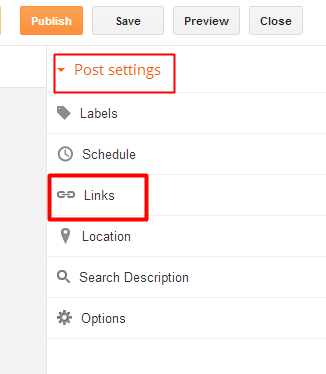
  • At the right side, under the menu 'Post Settings' click the option 'Links'                                                                                           

How to use 'Custom Permalink' feature in blogger for On-Page SEO.

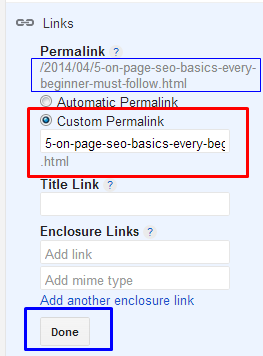
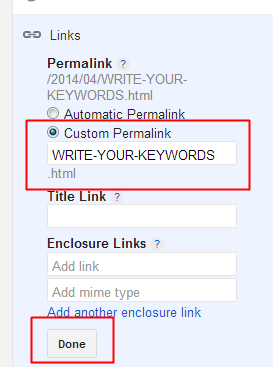
  • Now select 'Custom Permalink' and write your keywords as I shown in the below picture. Leave the 'Title Link' and 'Enclosure Link' as blank and finally click 'Done'.                                 Use " - " in middle of the words instead of leaving spaces.
How to use 'Custom Permalink' feature in blogger for On-Page SEO.
  • Thats it. You have succesfully created your own url by using the custom permalink feature.
So if you are not satisfied with the automatic permalink, you can use custom permalinks which helps your post to get indexed in search results. 

You can also use this custom permalink feature for your old posts. If you want to improve your site seo perfomance, then try this custom permalinks for your old posts too, as this may helps your old posts to get reindexed in top positions on search engine. I will make my next post about how to apply custom permalink for old posts and how to redirect that newly created custom permalink to the old url which was created earlier. 

So I hope this custom permalink feature will helps you for on-page seo. If you have any questions, you can leave it in the below comments.

How to Change Facebook Profile User Name After Name Limit Reached.


Has your Facebook Account Name limit is Reached or Exceeded? 
So do you want to change your Facebook Profile Name After Name Limits? 

If so, follow the simple method written below.

Mostly many people dont know that facebook keeps some limits for Pages, Profiles, Groups, Friends, Events etc. Just like we can`t change facebook profile name after 5 times, we can`t change our profile username more than 1 time, we can`t change a facebook page name after 200 Likes, we can`t change facebook group name after reaching 250 members, we can`t add more than 5000 friends to our facebook profile and  it is not possible to change the name of an event if it has more than 5,000 people invited.

Now-a-Days, Many people are keeping Facebook Profile Names in Different stylish Fonts like ȼɦǿȼLąty Þrîñçé , Nitesh Iı'e Belııve'ııŋ Mąh-self , Іі'є-єм Ѕэжҷ'Айԁ Її' Ќйѳщ'Їт , Маиѳг Кнцмая etc. But Facebook is Banning the Accounts who using those type of stylish fonts, fake names.

Also make sure that your name can`t include:

  • Titles of any kind (ex: professional, religious, etc)
  • Symbols, repeating characters or punctuation, unusual capitalization and numbers
  • Words, phrases, or nicknames in the place of a middle name
  • Offensive or suggestive content of any kind
  • Characters from multiple languages
As per facebook rules, the profile name you use should be your real name as it would be listed on your credit card, student ID, govt-issued proof etc. So I personally suggest everyone to keep your facebook account of real name without any fonts or special characters.

So if your profile name limit is exceeded and want to change your facebook profile name to your real name, then Click Here 


Fill that form and you have to upload your valid Government-issued Proof - photo ID like a Passport or Driver's license etc and after your upload finishes, finally click "Send" button.

Any 1 Proof will be enough in the list of below examples,
Examples:
  • Green card, residence permit or immigration papers
  • Birth certificate
  • Personal or vehicle insurance card
  • Marriage certificate
  • Official name change paperwork
  • Voter ID card
  • Non-driver's government ID (ex. disability, SNAP or national ID card)
Note - If you don’t have a government-issued Proof-photo ID, you can submit copies of any 2 other documents that together show your full name, birthday and picture. 


Any 2 Proofs will be needed in the list of below examples,
Examples:
  • Credit card
  • Utility bill
  • School or work ID
  • Library card
  • Check
  • Bus card
For more information about the Submission of Proofs, check the Facebook Help Center Page by Clicking Here.

Before you submit your any valid ID proof, try to have a real picture on your facebook account because this may help you to get your name change fastly as facebook staff will consider your fb profile as real profile.

My Personal Experience : Earlier I faced this problem and facebook asked me to submit any Valid proof and I submitted my College ID card picture by taking a snap from my mobile. Facebook staff verified it and changed my name within 4-5 days. So I suggest you to take a clear picture of you proof either by Scanning or by capturing from a good camera or mobile.

If you have any doubts or problems regarding with this facebook profile name change after name limits reached issue , You can ask here in comments.

Earn Money or Get Facebook/Youtube/Twitter Likes Fans by Doing Social Hits

LikesPlanet is your way to Advertise your social pages or earn Money by doing Likes! 


How to get 10,000 Facebook Followers/Fan Page/Photo Likes in a Day

Simplify your Facebook marketing with Like-ex's - Like Exchange advanced Facebook functionality. With Like-ex - Like Exchange, you can get thousands of new Facebook Follower /Fan page likes /photo likes in a day..
Like-Ex.Com

Like-Ex.Com


Free Facebook Likes

گلوکار ابرارالحق دبئی میں روک لیاگیا

10 اپریل 2014 (11:38)

گلوکار ابرارالحق دبئی میں روک لیاگیا
دبئی (مانیٹرنگ ڈیسک) پاکستانی گلوکار اورتحریک انصاف کے رہنماءابرارالحق کو دبئی ایئرپورٹ پرروک لیاگیاہے ۔ ذرائع کے مطابق ابرارالحق دبئی پہنچے جہاں اُن کے پاس موجود پاسپورٹ پر دبئی کا ویزانہیں تھا جس پر امیگریشن حکام نے اُنہیں حراست میں لے لیاتاہم پاکستانی قونصلیٹ کے ترجمان کاکہناتھاکہ ابرارالحق کو گرفتار نہیں کیاگیابلکہ روکاگیاہے، وہ اصل پاسپورٹ پاکستان چھوڑآئے ہیں۔ ذرائع نے بتایاکہ پاکستانی قونصلیٹ کا عملہ پہنچ چکاہے اوردستاویزات آنے تک تحریک انصاف کے رہنماءکو ملک میں رہنے کی اجازت کیلئے سفارتخانے کی طرف سے تحریری درخواست کردی گئی ۔ امید کی جارہی ہے کہ دوسرے پاسپورٹ پر ویزا جاری کرکے ابرارالحق کو دبئی میں داخلے کی اجازت دے دی جائے گی تاہم ترجمان کاکہناتھاکہ ا ب یہ اماراتی حکام پر ہے کہ وہ اس خط کی بنیاد پر انہیں ملک میں رہنے دیتے ہیں یا نہیں۔ بتایاگیاہے کہ جس پاسپورٹ پر ویزاجاری کیاگیا، وہ پاسپورٹ ابرارالحق کے پاس موجود نہیں ۔ ابرارالحق کے ترجمان کاکہناتھاکہ گلوکار کو گرفتار نہیں کیاگیا، نام میں ایک حرف کے فرق کی وجہ سے روکاگیا۔

Kashmir Students finally blasted on India and Indian Media Truth Finally revealed


Kashmiri Students v Indians by Prince of Wah (Pakistan)

Kashmir Students finally blasted on India and Indian Media Truth Finally revealed
Kia ye sab Pakistani Media dikha sakta tha?
Nae Naa
India ne Dikha dia... APny he Media Channel Py

Shame on you Pakistani Media

Comment Below Your Ideas and Thoughts about this Video

Internet download manager life time activation without any key patch and crack


Internet download manager is a fastest download manager  to increase your download range speed of your corresponding downloading files  like videos ,movies,Mp3 files or any other files and applications .
In this case study of process I am  going to explain how to  activate your Internet Download Manager Softwarefor life time with out any serial Key and Patches and Cracks.We  introduced this because many of the patches and cracks don't work  and they may create viruses and Mallwares  when you install it into your Pc Or Laptop. So try this tool for faster and safer downloads.This is 100% working trick, go ahead with the simple steps below in this tutorial.

Features of this download Manager:
Option to control the downloads like resume ,schedule.
Incomplete downloads will be resumed automatically and you can download it next time from where the download is resumed / interrupted.
All premium features for free available in this tool.

Follow The Instructions Below :-

Step 1:- Install Current version of the  IDM from the Below Link.

Download IDM New Version click the below link :-
Step 2 :- Then open  the file  "IDM crack for life.exe" file .

Download IDM crack for life.exe by the below link

Download Link :- 


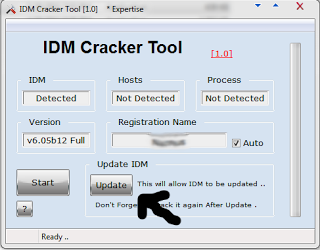
Step 3 :-  Then Click the  Update Option in the IDM Cracker Tool as shown in the Image Below.


Step 4 :- And Further  Go to IDM > Help > Check for Update & update the software.

Step 5 :-  And Next Again Open IDM crack for life.exe again and click "Start" .That is done Your Process is Completed Successfully.Now your IDM Software is registered to Full Version Successfully.
After completing all steps Go to the Help button  and click that in and in that click the About IDM option.Now it is activated as full version.Image is shown below.

Note :-
After Activating This Trick Never Update The IDM software.This is 100% working Trick,if any problems feel free to put comments here.

How To Use Andriod Internet on PC


Requirement : 1) Android Phone.  2)Usb Cable.


1:Enabled the usb debugging setting.

2:Download file's reverse thetering from https://www.dropbox.com/sm/create/ReverseTethering_2.30_%20ceh.Fida.zip
3:Extract folder.Choose androidtool.exe like the image below.
4:connect USB
5:Select your phone device and connect box will appear.
6: Allow the grant message on your phone.


Send Files Via Wifi


First of all you should have below thing:

1. A WiFi Internet Modem or You can make your laptop WiFi Hot-spot using this trick.
 2. Android phone or tablet 
 3. Obviously a computer or laptop Now just follow these steps.
Now just follow these steps.
STEP 1:
First of all connect your phone with  WiFi.

STEP 2:
Now just download WiFi File Transfer from Google Play Store.

STEP 3:
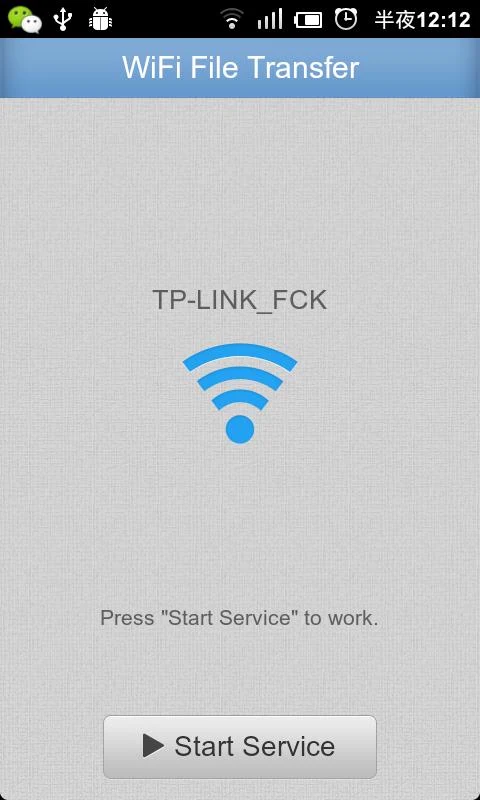
Now just run the downloaded app. Here you will see on option to start service. Just touch on that.
STEP 4:
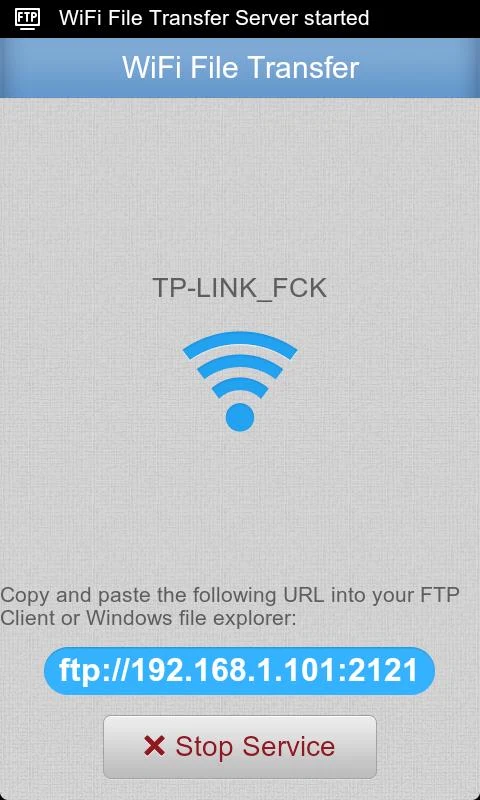
Now this will generate an unique ftp address in this format – ftp://ip-adress:port as shown in below screenshot.
...STEP 5:
Now open My Computer  in your computer of laptop. Here just fill the the ftp address in address bar as shown in below screenshot.
WiFi File Transfer - screenshot
...STEP 6:
Now you will see that you file manager of your phone in your computer. Please note that there is no need of internet connection in this. You should have only WiFi connection in both device.

How to Hack Facebook Fan Page by Hijacking


However it's a simple facebook bug which helps the admins to remove another admin. However facebook should set up a rule that the original admins should not be removed. The following video by Sophos explains how easy it is to hijack facebook fan pages.However it's quite strange to see according to facebook help page, Primary or original admin cannot be removed. However it's untrue. Which evolves the whole idea of Hijacking facebook fan pages.http://www.youtube.com/watch?feature=player_embedded&v=4LSKEoXJUDY ( Hijacking Facebook fan pages tutorial )