Showing posts with label How To. Show all posts
Showing posts with label How To. Show all posts
Facebook Theme / New Tricks
Hi Guys......!
You Can Change Your Facebook Theme and Can Use Many of New Tricks Now...
Here are Some Themes for Example....


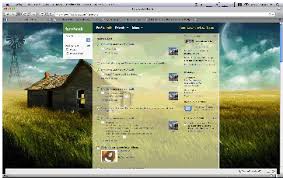

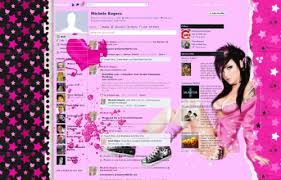
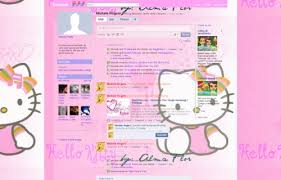
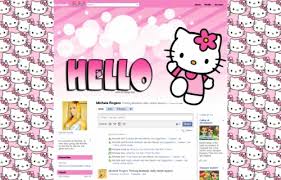
You have to follow only few steps to get it :)

Login Here...
You Can Change Your Facebook Theme and Can Use Many of New Tricks Now...
Here are Some Themes for Example....
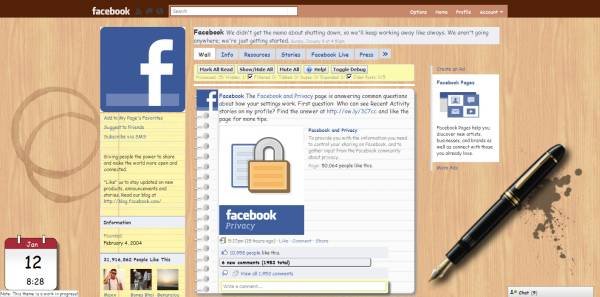
You have to follow only few steps to get it :)
STEP 1
Open This Link===> Fb'Theme <====
Login Here...
STEP 2
After login... click on any of any of theme... and see magic :)Done....
An image as a link:How to Use WhatsApp on Computer or Laptop - Windows 7/8 and Mac
Many people have been searching about how to dowload WhatsApp on Computer/Laptop and finally a simple procedure is written below for installing whatsapp on your Windows Os and Mac Os of your Pc/Laptop.
WhatsApp is the most famous mobile messenger app of having amazing features like text messages, voice messages, images, videos, smileys, file sharings etc.

WhatsApp is officially released for only Smartphones of Android, BlackBerry OS, Apple iOS, Symbian,Windows Phone but not for computer/laptop.
There are many softwares in internet which will helps us to run android apps on our Pc/Laptop but the best one is Bluestacks which will convert Android versions to Pc versions. So in this post we are using Bluestacks software for installing whatsapp on Pc/Laptop.
Note - Bluestacks is only supported on Pc/Laptop having graphic memory or graphic card.
Steps for Installing WhatsApp on your Computer/Laptop of Windows 7/8 or Mac :-
Step1 :


Have Fun - Chatting - Voice messages and much more on your pc/laptop`s whatsapp.
WhatsApp is the most famous mobile messenger app of having amazing features like text messages, voice messages, images, videos, smileys, file sharings etc.

WhatsApp has now 350 million monthly active users and it became highly downloadable android app in few months.
WhatsApp is officially released for only Smartphones of Android, BlackBerry OS, Apple iOS, Symbian,Windows Phone but not for computer/laptop.
There are many softwares in internet which will helps us to run android apps on our Pc/Laptop but the best one is Bluestacks which will convert Android versions to Pc versions. So in this post we are using Bluestacks software for installing whatsapp on Pc/Laptop.
Note - Bluestacks is only supported on Pc/Laptop having graphic memory or graphic card.
Steps for Installing WhatsApp on your Computer/Laptop of Windows 7/8 or Mac :-
Step1 :
- Download Bluestacks software by Clicking here.
- After the download of bluestacks completes, install it on your Pc/Laptop.
- After succesfull installation of bluestacks, there are two methods to install whatsapp on our bluestacks software.
Method 1: Open your bluestacks and you will see an option App Search or a small Search Icon on the top right corner. So now type Whatsapp in the search box and download it.
Recently some people said that they have a problem in finding Whatsapp in Search box of App Search. So if you have any problem of finding Whatsapp in App Search then simply follow the below process of method 2,
Method 2: There is an Icon 'Help' on the homepage, so click that 'Help' button and it will redirect you to internet within the bluestacks.

So when you are redirected to internet, you will see some URL field at the top.
so now in that url field paste - http://www.whatsapp.com/

and go there and download your whatsapp.

when you click Download Now button, bluestacks will ask you to choose a method to download whatsapp like in the below picture,
so you can select any method but choosing Google Play Store will makes our task easier.
Step 2 - Activating WhatsApp on your Pc/Laptop.
- After your download of whatsapp completes, install it.
- After Installing Whatsapp then it will ask you to enter your Mobile number for which you want to use your Whatsapp.
- Now verify your Mobile number by sms or call as the same procedure which we do for installing whatsapp on mobile.
- Enter Verification Code and now Your whatsapp is successfully activated on your Computer/Laptop.
- Open Contacts,

and manually enter your friend contact nos who are using whatsapp.
One thing you should make a note is that you cannot use a same whatsapp no on your both mobile and computer. Those who dont have smartphones to use whatsapp on mobile can download this computer bluestacks version and can use whatsapp on your computer.
If you have any doubts or issues about how to use whatsApp on pc/laptop, You can comment here in below. If you find thi s post helpful then please share our site with your friends and help us to grow .
If you have any doubts or issues about how to use whatsApp on pc/laptop, You can comment here in below. If you find thi s post helpful then please share our site with your friends and help us to grow .
SEO basics that Every Beginner must follow for His Blog's Success
Search Engine Optimization (SEO)
As per wikki, Search engine optimization(Seo) is the process of affecting the visibility of a website or a web page in a search engine's search results.
SEO is of two types, On-Page SEO and Off-Page SEO. On-Page SEO means the things which we do within in the page/website. Off-page SEO means optimizing the web pages outside the website by building links back to it (Backlinks). These back links will act as a vote to the content of our blog. The more backlinks you have is the more better you can rank your site well in search results.
The things which we do on on-page seo will helps our posts to get indexed in search results. For example, some person is searching about ''how to design my facebook profile wall in a attractive way'' on google,

Making use of meta description tags also helps in seo because Google might use them as snippets for our pages.
As per wikki, Search engine optimization(Seo) is the process of affecting the visibility of a website or a web page in a search engine's search results.
SEO is of two types, On-Page SEO and Off-Page SEO. On-Page SEO means the things which we do within in the page/website. Off-page SEO means optimizing the web pages outside the website by building links back to it (Backlinks). These back links will act as a vote to the content of our blog. The more backlinks you have is the more better you can rank your site well in search results.
But being a beginner, you should focus on on-page seo first to make your content visible to whole word by search engines. When I was a beginner, I dont know anything about blog basics, seo, how search engine works etc. I use to read many blogs and use to apply all those learned things on my blog tricks99.com, thus how I have gained some knowledge in this field. I will tell you all the useful points based on my experience in this post.
The things which we do on on-page seo will helps our posts to get indexed in search results. For example, some person is searching about ''how to design my facebook profile wall in a attractive way'' on google,
You can see that our site tricks99.com was standing in 1st place of google search page for that search query.
So how I got into the 1st postion of 1st page of Google search?
Just by doing On-Page SEO only. I'm sharing all my tips with you, explaining each and every term and its uses in the below part. So if you follow all these basics, I'm sure that you will run your blog in a succesful way.
1)Title:
Title plays an important role in SEO.
Google search engine will display search results based on the user query words. so if the query words matches the title in our blog posts, then our post will appear in search results.
Things to follow in Title:
- Make a title that describes your entire post. Also, make sure that your main keywords are present in the post title.
- A visitor who comes to our site will deicdes to read a post or not just by reading the title of the post. So if you dont create attractive titles, you may loose readers to your posts.
- Create unique titles for each post.
Things to avoid in Title:
- Dont stuff too many keywords or unneeded keyowrds in your title.
Making use of meta description tags also helps in seo because Google might use them as snippets for our pages.
In meta description, write a brief a brief summary of what the post is about. It can be a few words or few sentences. But there'z no guarantee that google always uses meta descriptions as snippets in search results. Mostly google uses relevant section of our page's visible text as snippets. If it can't find any visible text, then it will use meta description in snippets. So if you are really serious about on-page seo, then make the use of meta description too.
3)URL(Permalink):
Many people don't know that URL also plays an important role in on-page seo. If the user query words matches with the words present in our post url, then there is chance for our post to appear in google search results page.
In blogger platform, whenever we write a post, the URL will be generated automatically by the title which we kept. Only the first half part of the title will be taken into url. So we may miss any important keywords in that automatically generated url.
So thats why we have to make use of Custom Permalink feature when you write posts, as url also helps your post to get indexed in search results.
Also see - How to use 'Custom Permalink' feature in blogger for On-Page SEO.
4) Image Optimization:
You should also optimize the images which you upload in the post. Here are few things to optimize images for seo to increase blog traffic.

Here comes the major part. Content really matters a lot for your blog's success. Google loves unique, fresh content. So always try to write 100% unique content on your own which will help you to get indexed in top results of the search pages. Page rank of your site will also get increased if your site has unique, quality articles.
Mostly google crawls first and second paras only. So make sure that the post keywords are present in those first 2 paras. Also, dont stuff too many keywords 'coz it is against the rule. Your posts can be considered as spam if you have too many keywords. So always try to be genuine. Try to write posts containing 500+ words for better seo results.
Also you must notice that, google adsense will be approved for the sites only who have quality and unique contents. Never try to copy, scrap any articles from other sites. Google will never approve adsense for the sites having duplicate contents.
Also, never copy images from other sites. If you want to copy any image from other sites, then mention the image credits. Make sure that you don't commit gramitical mistakes while writing a post.
Some other important tips for your blog's success:
3)URL(Permalink):
Many people don't know that URL also plays an important role in on-page seo. If the user query words matches with the words present in our post url, then there is chance for our post to appear in google search results page.
In blogger platform, whenever we write a post, the URL will be generated automatically by the title which we kept. Only the first half part of the title will be taken into url. So we may miss any important keywords in that automatically generated url.
So thats why we have to make use of Custom Permalink feature when you write posts, as url also helps your post to get indexed in search results.
Also see - How to use 'Custom Permalink' feature in blogger for On-Page SEO.
4) Image Optimization:
You should also optimize the images which you upload in the post. Here are few things to optimize images for seo to increase blog traffic.
- Using keywords in image name. For example, you have downloaded an image from web, the default name will be given as Image1.jpg. So if you want to upload that image into your blog post, then instead of uploading it directly, change the default name to the keyword name of your post and then upload it. If I upload any picture in this para, then my image name will be image-optimization-seo.jpg.
- Using Title Tag and Alt Tag. Title tag and Alt tag works as description for your images. So whenever you upload any images into a post, fill these title tags and alt tags with keywords of that particular post.
- Using watermarks on your images, so that people wont copy your images. Just like I'm using tricks99.com on my images in my blog posts.
Here comes the major part. Content really matters a lot for your blog's success. Google loves unique, fresh content. So always try to write 100% unique content on your own which will help you to get indexed in top results of the search pages. Page rank of your site will also get increased if your site has unique, quality articles.
Mostly google crawls first and second paras only. So make sure that the post keywords are present in those first 2 paras. Also, dont stuff too many keywords 'coz it is against the rule. Your posts can be considered as spam if you have too many keywords. So always try to be genuine. Try to write posts containing 500+ words for better seo results.
Also you must notice that, google adsense will be approved for the sites only who have quality and unique contents. Never try to copy, scrap any articles from other sites. Google will never approve adsense for the sites having duplicate contents.
Also, never copy images from other sites. If you want to copy any image from other sites, then mention the image credits. Make sure that you don't commit gramitical mistakes while writing a post.
Some other important tips for your blog's success:
- If you are a beginner, make a XML sitemap for your site and submit that sitemap to google by webmaster tools. This sitemap helps google search engine to discover the pages on your site. So according to my opinion, you should definetely submit a sitemap for search engine to crawl pages on your site.
- Never do any black hat seo techniques because google is so strict against such activites. Your site may get banned by following such illegal techniques.
- Dont stuff too many keywords in the post or don't repeat the keywords too many times 'coz google may consider your page as spam.
So these are the main on-page seo basic that every beginner must follow. Whenever you make a new post, share it on all social networking sites like facebook, google+ etc as these will act as backlinks, drive traffic to your post. If you have any doubts regarding this post, you can leave your comments below. Also, if you have any other seo tips, you can share it in the below comments.
How to use 'Custom Permalink' feature in blogger for On-Page SEO
If you're a new bie in blogging field, you should definetly know about the on-page seo and off-page seo. Without knowing anything about SEO, you should not expect any good results from search engines like google, bing etc. Before you make posts on your blogger, just spend a few mins for thinking about what are the things you are going to use for on-page seo for that partcular post.
You should always remember that if the user query words in search engine matches with the words present in our post url, then there is chance for our post to appear in search results page.
What is Custom Permalink?
Custom permalink is a feature by which we can insert our own keywords in the url field.
In general, url will be constructed automatically by considering the first half part of the title. The words which are present in the first half part of the title will be taken as words in the url. In this case, only some keywords will be taken into url, so what about the other missing important keywords?
For example, the title of my recent post is "5 On-Page SEO basics that Every Beginner must follow for His Blog's Success.", so my automatic generated url will be like this,

"2014/04/5-on-page-seo-basics-that-every.html'', which dosen't look good for me because my main keywords are not present in that url.
So in that case, we have to use custom permalink featrure which means that we can insert our own keywords in the url. Now I'm using custom permalink for that post as I'm not satisfied with the automatic permalink. I will write my custom permalink in such a way that my main keywords will be present which will help me for on-page seo.
The custom permalink which I did for that post is,
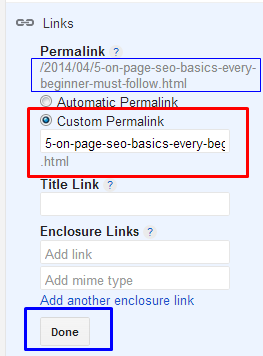
"http://www.tricks99.com/2014/04/5-on-page-seo-basics-every-beginner-must-follow.html'', my complete keywords are present in this custom permalink.
"2014/04/5-on-page-seo-basics-that-every.html'', which dosen't look good for me because my main keywords are not present in that url.
So in that case, we have to use custom permalink featrure which means that we can insert our own keywords in the url. Now I'm using custom permalink for that post as I'm not satisfied with the automatic permalink. I will write my custom permalink in such a way that my main keywords will be present which will help me for on-page seo.
The custom permalink which I did for that post is,
So now how to do these custom permalinks when you're writing posts in your blogger?
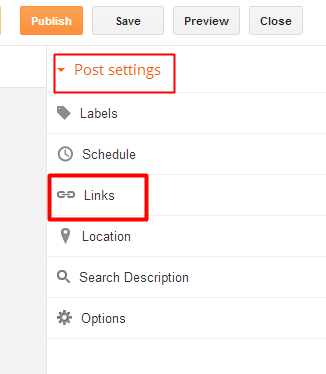
- At the right side, under the menu 'Post Settings' click the option 'Links'
- Now select 'Custom Permalink' and write your keywords as I shown in the below picture. Leave the 'Title Link' and 'Enclosure Link' as blank and finally click 'Done'. Use " - " in middle of the words instead of leaving spaces.
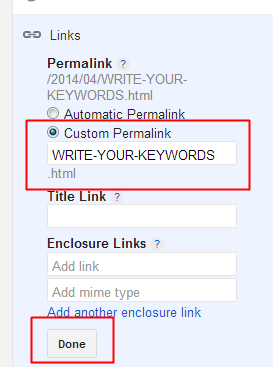
- Thats it. You have succesfully created your own url by using the custom permalink feature.
So if you are not satisfied with the automatic permalink, you can use custom permalinks which helps your post to get indexed in search results.
You can also use this custom permalink feature for your old posts. If you want to improve your site seo perfomance, then try this custom permalinks for your old posts too, as this may helps your old posts to get reindexed in top positions on search engine. I will make my next post about how to apply custom permalink for old posts and how to redirect that newly created custom permalink to the old url which was created earlier.
So I hope this custom permalink feature will helps you for on-page seo. If you have any questions, you can leave it in the below comments.
How to Hack Facebook Fan Page by Hijacking
However it's a simple facebook bug which helps the
admins to remove another admin. However facebook should set up a rule that the
original admins should not be removed. The following video by Sophos explains
how easy it is to hijack facebook fan pages.However it's quite strange to see
according to facebook help page, Primary or original admin cannot be removed.
However it's untrue. Which evolves the whole idea of Hijacking facebook fan
pages.http://www.youtube.com/watch?feature=player_embedded&v=4LSKEoXJUDY (
Hijacking Facebook fan pages tutorial )

Submit your blogs to Search Engines

Submit your blogs to Search Engines
Search Engine Optimization (SEO) is to establish the number and quality of traffic to increase to websites with search engine results. Search engines work on different algorithms to the content and keywords, and the presentation of search results to analyze.
Google, for example, notes pages and page ranks of sites that rank will occur very early in the results. Of course, many other factors that search engines, such as relevance, unique content, coding and quality. The major search engines know how to detect these factors will only manipulation of the ranking system to encourage, and so secretive about the way the ranking algorithms work.
Although no SEO consultant can be sure how each search engine your site, a common agreement that what your site is visible on the internet see higher rankings in the end. Once your site with links to many other sites indexed by various search engines and the exposure and visibility
Here we give an overview of search engines that your website or blog site to submit and get your website or blog indexed by search engines.
Indexing Site
Unless you have a private blog, it's a matter of time that your blog is indexed by major search engines like Google, Yahoo and MSN. One of the fastest ways to get your site indexed is another site that is already in the search engine to connect with you. When search engine crawlers to visit this site, they will find and index your site.
So try this method if you do not want to wait for search engines to submit your site to approve.
Before we look at the list of search engines, there are several points to note: -
First make sure your site is indexed by search engines, you must type the full URL to their search. For some search engines, such as Microsoft Live Search, type site: followed by the full URL. If your site appear in search results, which are indexed, and there is no need to resubmit your site.
Other If your blog is a link to the blog directories, web sites or blogs, you can use these other sites that mention blogs appear first in search results. More often than not, they have a higher page rank. Browse through the other pages in the search results and you will surely find a list that is just about your blog.
Third, when you submit your site, you do not send the URL of any webpage. Send only top-level page to Blogger blogs will be like this http://blogname.blogspot.com address without the www. blogging name.
4th You can create your sitemap to Google and sign up for Google Webmaster site to the status of the indexing to know and view statistics on traffic. Also, a sitemap for Yahoo! For more information about indexes and links to learn your site. Send Blogger Sitemap MSN and Ask.com also.
5th If you are the Yahoo! site, you will in other search engines such as AltaVista and AlltheWeb, as well. AOL Search also uses data from Google.
Sixth Some sites to receive news and advertising in exchange for free entry. If you do not want, do not forget to turn away from it. Prevent your email address regularly filled with the creation of a free web based e-mail only for web-mail.
Seventh Because search engines have different standards for the content, design and technical specifications, your site is no guarantee that it will be included in their database.
List of search engines
Can you put your URL to these search engines for free. If you have no time, your site to the top of a number of leading search engines.
http://www.google.com/addurl/.
http://www.bing.com/webmaster/SubmitSitePage.aspx.
http://www.alexa.com/help/webmasters#crawl_site.
http://www.baidu.com/search/url_submit.html.
http://www.exactseek.com/add.html.
http://searchsight.com/submit.htm.
http://www.scrubtheweb.com/addurl.html.
http://www.entireweb.com/free_submission/.
http://gigablast.com/addurl.
http://www.exalead.com/search/??definition=submitYourSitePage&nojs=1.
http://www.searchking.com/add_new.htm.
http://www.whatuseek.com/addurl-secondary.shtml.
http://www.anoox.com/add_for_indexing_free.jsp.
http://www.splatsearch.com/submit.html.
http://www.walhello.com/addlinkgl.html.
http://www.searchit.com/addurl.htm.
http://www.mozdex.com/support/addurl.html.
http://submit2.jayde.com/.
http://www.infotiger.com/addurl.html.
http://www.abacho.de/.
http://monster.exploituk.net/suspended.page/.
http://www.towersearch.com/addurl.php.
http://www.the-search-site.com/add_url_form.asp.
http://www.websquash.com/cgi-bin/search/search.pl?Mode=AnonAdd.
http://unasked.com/webmasters.
http://search.evisum.com/addsite.htm.
http://dinosearch.com/dinosearch/addurl.asp.
http://www.searchtheweb.com/suggest/.
http://www.bestyellow.com/addurl.html.
http://www.beamed.com/search/AddURL.html.
Website Submission Services
There are many sites on the internet offering free website submission services to search engines. The list of search engines are by and large the same. For a fee, some of them offer to send your URL to more than a hundred search engines. Is it necessary to have your webpage listed in all the smaller search engines? We think that Google, Yahoo! and MSN have cornered such a large share of the market that it is sufficient just to have your website listed there. However, the decision is yours to make. For a start, you may want to use their free services and monitor the traffic.
http://www.evrsoft.com/fastsubmit/.
http://www.submitexpress.com/.
http://www.addme.com/.
http://www.freesubmissionweb.com/.
http://www.ineedhits.com/free-tools/submit-free.aspx.
http://www.submitshop.com/freesubmit/freesubmit.html.
http://www.searchengineoptimising.com/free-search-engine-submission.
http://www.addpro.com/submit30.htm.
http://www.pageranklist.net/search_engine_add_url.php.
http://freewebsubmission.com/.
http://addurl.amfibi.com/.
http://www.burf.org.uk/submit.php.
http://submitforce.jerkasmarknad.com/.
http://www.localsubmit.com/free.asp.
http://www.srsubmit.info/.

Submit your blogs to Search Engines
Free Get 2500+ Backlinks in Few Minutes
Free Get 2500+ Backlinks in Few Minutes

Instead of putting things off behind creating back backlinks, you my Technique to get back backlinks and start making Good Quality articles, soon The google start nurturing your website.
Which type of backlinks?
Well these back backlinks are from whois way of websites, which shops infromation about your website and providing you no cost back backlinks. This is absolutely secure way to get back backlinks.
It is no cost way to produce back backlinks and increase your Website exposure easily. These Sites are usually “who is”, “about us”, “website statistic”, etc. way of services.
How to Get it?
To get Free back backlinks, adhere to below steps;
Go to http://www.imtalk.org/cmps_index.php?pageid=IMT-Website-Submitter
Add You website/blog url.
Add Targeting Keyword for you Blog home page.
Select option [no. of back links 50 to 2509]
Click on Submit and wait for system to submit it to all URLs.
After Submission
Add all the links in to http://www.linklicious.me, they will index all the URLs. So you get more benefits.
Benefits
Free backlinks
Get faster rank in Search engine
High Traffic
<<<EnjoY>>>
Free Get 2500+ Backlinks in Few Minutes
Whatsapp for Pc full version Free Download
Whatsapp for Pc full version Free Download

Usb Antivirus is also a most powerful antivirus coding system created By a Pakistani engineer
..its self-propelled vehicle notice Autorun Viruses and Clean and it in addition Repair Folder selection and show hidden files....
Whatsapp for Pc full version Free Download
PHP Designer 8 Full Version With Key Gen Free Download
PHP Designer 8 Full Version With Key Gen Free Download

PhpDesigner eight may be a lightning and a robust quick PHP EDITOR and PHP IDE ,but PHP-designer eight conjointly a full featured CSS3,HTML5 and JavaScript editor boosted with options to extend your productivity for each beginners and skilled developers.
php-Designer eight assists you with everything from redaction, analyzing, debugging to commercial enterprise websites hopped-up by HTML5,PHP, CSS3 by JavaScript and alternative languages.

PHP Designer 8 Full Version With Key Gen Free Download
How to Turn off Facebook Notification Sound with Easy Steps
Facebeen has been the regular thing for the people around world to use. It is one of the most used social network on the web. The teen agers are specially using it very much and most of them are connected with their friends by the use of it with various smart phones. It is absolutely important for the people who've got habits of using this. Now they can not escape their selves from the use of this. As all of us know that the Facebook is being famous in group of social networks. Facebook updates many features in its interface after a short period of time.

Thus, It has brought one another feature for all of its users. Which is Sound Notification, When there becomes a new notification on your Facebook profile at that time a sound beeps to attend you that you've a new notification from the Facebook. But while attending us it makes us feel bad. It is good to beep when we receive a chat message, But with the every notification can get irritating. You don't need to worry about this, Because we've the way of turning it off. It is very easy and simple to set it, with a few steps and get rid from it and use Facebook in a peace atmosphere.
Just follow the below steps and get this feature don't happen again, which made you feel bad.
Step#1: From the top right corner of Facebook bar click on gear to drop it down and select Account settings.

Step#2: After the selection of settings another page will appear, from this page just click on the notifications which is shown on the left side bottom of Account Settings page.

Step#3:
Now after clicking on the Notifications, You will see "On Facebook" just click on view option of this and let it to be opened.

Step#4: Now at the last step all you need to do is to Untick the given box as mentioned in the below image, Where something like this is asked "Play a sound when each new notification is received." Once you Untick it then just click on "Save Changes" and you're done.

Congratulation You've turned off the Feature of Notifying you by sound for each notification you got. Just It was easy to manage it, But some of us were not aware from this, by this article I hope they got the point of setting up this feature. If you've any question related to this post or blog and want to suggest us then comment it in below section.

Thus, It has brought one another feature for all of its users. Which is Sound Notification, When there becomes a new notification on your Facebook profile at that time a sound beeps to attend you that you've a new notification from the Facebook. But while attending us it makes us feel bad. It is good to beep when we receive a chat message, But with the every notification can get irritating. You don't need to worry about this, Because we've the way of turning it off. It is very easy and simple to set it, with a few steps and get rid from it and use Facebook in a peace atmosphere.
Just follow the below steps and get this feature don't happen again, which made you feel bad.


Congratulation You've turned off the Feature of Notifying you by sound for each notification you got. Just It was easy to manage it, But some of us were not aware from this, by this article I hope they got the point of setting up this feature. If you've any question related to this post or blog and want to suggest us then comment it in below section.
Large Collection of User Interface Design Tools | Blogger, Wordpress Templetes
User Interface Design Tools A Web Designer Must Have
1. ForeUI
![ForeUI[3]](http://cdn.tripwiremagazine.com/wp-content/uploads/2012/03/ForeUI3.jpg "ForeUI[3]")
ForeUI is an easy-to-use UI prototyping tool, designed to create mockup / wireframe / prototypes for any application or website you have in mind. With ForeUI, your prototype project will be skinnable. Easily change the look and feel of your prototype by simply switching the UI theme.
2. LivePipe UI

LivePipe UI is a suite of high quality widgets and controls for web 2.0 applications built using the Prototype JavaScript Framework. Each control is well tested, highly extensible, fully documented and degrades gracefully for non JavaScript enabled browsers where possible.
3. DesignerVista

Design Professional Quality GUI Mockups using tremendous number of native controls, widgets, clip art, icons, etc. available right in the application. Practically anything you might want to put on a GUI screen is already available, and in high quality art in DesignerVista
4. Napkee


5. iPhone Mockup

iPhone Mockup lets you create user interface for an iPhone app in a drag and drop system.
6. Eclipse Stencil for OmniGraffle

This stencil enables you to easily prototype Eclipse (wizard) dialogs with OmniGraffle.
7. Gliffy
![Gliffy[3]](http://cdn.tripwiremagazine.com/wp-content/uploads/2012/03/Gliffy3.jpg "Gliffy[3]")
Gliffy free wireframe software makes it easy to create website wireframes and to share web mockups with anyone.
8. Small GUI Pack
![Small-GIU-Pack[3]](http://cdn.tripwiremagazine.com/wp-content/uploads/2012/03/Small-GIU-Pack3.jpg "Small-GIU-Pack[3]")
Small Graphical User Interface Elements Pack.
9. Wireframe Magnets (DIY Kit)

This DIY magnet template is based on the Konigi wireframe stencils and includes 3 sheets of elements that might be useful in whiteboard prototyping.
10. Flex 3 Stencil

Includes all Flex components from Flex 3 Style Guide: panels, data grid, buttons, fields, links, toggle, menu, scrolls, accordion, tabs, list, data picker, tool tip, errors etc.
11. Facebook Applications

A pretty sizable collection of Facebook related elements to use in creating wireframes for Facebook applications.
12. Patternry

Patternry is a user interface design pattern library aimed to help solve common interface design problems.
13. User Interface Design Patterns

User Interface Design patterns are recurring solutions that solve common design problems. Design patterns are standard reference points for the experienced user interface designer.
14. Pattern Tap

Pattern Tap is here to satisfy and encourage the inspiration needs of interface design peers and peeps. It aspires to be the one stop pattern shop for your next inspiration need.
15. User Interface Design Framework

A free User Interface Design tool for Web Designers.
16. Lumzy

Lumzy is a quick mockup and creation and prototyping tool.
17. Android Asset Studio

The launcher icon generator will create icons that you can use in your Android application, from a variety of source images. To begin, simply enter the input details below. Output will be shown below.
18. Mephobox

Great resource for finding design pattern inspiration. You can browse by user or website, or check out collections based on individual design elements.
19. Mobility UI Design Elements

A free set of UI design elements.
20. Mockingbird

Mockingbird is an online tool that makes it easy for you to create, link together, preview, and share mockups of your website or application.
21. Serena Prototype Composer

Serena Prototype Composer makes it possible to simulate how an application will look and function before any code is ever written.
22. Fivesecondtest

Fivesecondtest helps you fine tune your landing pages and calls to action by analyzing the most prominent elements of your design.
23. Android UI Elements Set

Free set of classic Android OS UI elements.
24. Massive Web UI and Button Set

This set contains all of the following elements in three distinct styles: glossy, satin/light gradient, and one-color. The satin/light gradient set is available in 7 different colors (which you’ll find all of in the psd file), all of these for free.
25. Best Practice UX Forms Stencil

This forms contain different button layouts, a progress indicator, captcha code input field, labels and more.
26. The Pencil Project

The Pencil Project’s unique mission is to build a free and opensource tool for making diagrams and GUI prototyping that everyone can use.
27. Mocklinkr

Use mocklinkr to convey your static mockups as a linked-up and clickable website to impress your clients.
28. MockFlow

MockFlow helps to design interactive UI mockups for Desktop Software, Rich Internet Apps and Web sites.
29. OSX Leopard GUI Set

The package includes fully editable vector Photoshop sources and a customizable Fireworks PNG file, the original fonts that were utilized for the making of the GUI are also included.
30. iPad GUI Set

Everything you need for your iPad app layout in layered, vector PSD files.
31. iPlotz

iPlotz allows you to rapidly create clickable, navigable mockups and wireframes for prototyping websites and software applications.
32. ALL In One Web Elements Kit

Complete set of web elements you may find very useful for your upcoming project. A huge set of various web elements, easy to modify trough layer styles.
33. Javascript Kit

One of the original javascript snippet libraries on the Internet
34. Concept Feedback

Post your designs and concepts and get free feedback from the design community.
35. Webappers

Lots of jquery components including a very good collection of image editing snippets.
36. DHTMLX

DHTMLX is a JavaScript library that provides essential functionality for building cross-browser, Ajax-based user interfaces. Develop impressive web applications faster with a set of ready-to-use UI widgets.
37.HTML Goodies

Jquery resource with excellent step-by-step documentation.
38. Dojo

Dojo saves you time, delivers powerful performance, and scales with your development process. It’s the toolkit experienced developers turn to for building superior desktop and mobile web experiences.
39. Code Sucks

Javascript snippets with extremely detailed write ups about how they work.
40. Echo 3

Echo behaves as a user interface toolkit–like Swing or Eclipse SWT. AJAX technology is employed to deliver a user experience to web clients that approaches that of desktop-based applications.
41. Snipplr

A good resource with lots of newer scripts and jQuery techniques.
42. Midori

Midori is an ultra-lightweight JavaScript framework that gets the job done without getting in your way.
43. roScripts (beta)

Scripts, Snippets and Resources that can be voted on by users.
44. Scripty 2

Script2 is a powerful flexible Javascript framework to help you write your own delicious and user interfaces. .
45. Snippet Library

A library of user-submitted and reviewed snippets and code tutorials from a variety of programming languages.
46. ZK

ZK includes over 200 ajax components, all ready to go.
47. jQTouch

A jQuery plugin for mobile iPhone application development.
48. Hot Gloo

The Online Wireframe Application.
49. qTip2

A jQuery upgrade for the qTip tooltip plugin. Easily make stylish tooltips for your site.
50. WebResources Depot

Included in their large directory of design resources is a number of very useful scripts and snippets.
51. Fillerati

A unique alternative to Lorem Ipsum. Generate blocks of real text for your mockup. Select to receive your text from a variety of public domain works.
52. Open Source Scripts
![Open-source-scripts[3]](http://cdn.tripwiremagazine.com/wp-content/uploads/2012/03/Open-source-scripts3.jpg "Open-source-scripts[3]")
Providing Javascript snippets and code.
53. HTML Assets

This is a collection of free Javascript code snippets. It has scripts setting the default focus on page elements (useful for HTML forms), scripts to auto-jump to the next form field when the current form field is full, and scripts to display the current date and time, reload the web page, print the web page, view the page source, close the browser window, and go back to the browser’s previous web page.
54. Mini Ajax

A collection of extremely elegant snippets.
55. Webcodr.com

A few very useful snippets for your website.
56. Editable Grid

EditableGrid is an open source Javascript library aimed at turning HTML tables into advanced editable components. It focuses on simplicity: only a few lines of code are required to get your first table up and running.
57. Cacoo

Cacoo is a user friendly online drawing tool that allows you to create a variety of diagrams such as site maps, wire frames, UML and network charts. It can be used free of charge.
58. Slidenote

SlideNote is a customizable, flexible jQuery plugin that makes it easy to display sliding notifications on your website or in your web application. It’s also available as a WordPress plugin.
59. Denim

DENIM is a system that helps web site designers in the early stages of design. DENIM supports sketching input, allows design at different refinement levels, and unifies the levels through zooming.
60. Placehold.it

A quick and simple image placeholder service.
If you have a plan for selling products and services I’ll recommend you are using a WordPress landing page theme or some WordPress ecommerce themes. Also don’t miss these best wordpress themes if you’re looking for a great theme for your website.
Subscribe to:
Posts (Atom)